Create a Backend Service
- What is a Backend Service?
-
A Backend Service is a microservice application responsible for handling business logic, data management, and integration within the OneCX platform. It is typically generated using the OneCX App Generator and built on modern frameworks such as Quarkus. Within the OneCX ecosystem, a Backend Service acts as the backend layer that processes requests from UI Apps and other services. It exposes REST APIs, manages persistence, and implements domain-specific logic. A service can function independently or as part of a larger microservices architecture, communicating with other components to deliver complete business capabilities.
more details about SVC you can find in the link below: https://onecx.github.io/docs/documentation/current/docs-guides-quarkus/quarkus-svc.html
|
The backend created with the OneCX SVC Generator has just the basic structure. You will need to further develop and customize the application to meet your specific requirements and business logic. |
Generate a Backend Service (SVC)
The OneCX SVC Generator creates a Quarkus-based backend service project following the standard OneCX service structure.
It generates the basic project setup, application configuration, Maven build configuration, Docker and Helm files, OpenAPI skeleton, and optional GitHub Actions workflow files.
The generator supports creating the initial service project structure first.
After that, entities can be added to the generated service project. Entity generation creates the basic persistence and API layers, including JPA entities, DAOs, services, REST controllers, mappers, tests, and Liquibase changelogs.
The creation of a new service project takes a while, as the generator sets up a complete Quarkus application with the required OneCX project structure and configuration.
Releases of generator: https://github.com/onecx/onecx-svc-generator/releases
Download the latest release of the generator from GitHub and save it as onecx-svc-generator.jar in your desired directory.
curl -L -o onecx-svc-generator.jar \
https://github.com/onecx/onecx-svc-generator/releases/download/v0.1.1/onecx-svc-generator.jar
Use generator with following command
java -jar onecx-svc-generator.jar create-svc \
  --name onecx-demo-svc \
  --group org.tkit.onecx \
  --package org.tkit.onecx.demo \
--build true|
The generator automatically fetches and uses the latest versions from GitHub for:
- If GitHub API is unavailable, well-tested default versions are used as fallback. The resolved versions are displayed during generation with source information. |
| Flag | Description |
|---|---|
|
Specifies the generated service project name. The value is used as the name of the generated project directory inside |
|
Specifies the Maven |
|
Specifies the Maven |
|
Specifies the base Java package name of the generated service. The value is used as the base package for generated application parts created from templates, such as controllers, DAOs, entities, mappers, services, exception mappers and tests. |
|
Specifies the parent output directory where the generated service project directory will be created. The generator creates a project folder inside this directory using the value of |
|
Builds the generated service project after generation by running Maven in the generated project directory. If you want to build it manually, you can omit this flag and run |
|
Generates the Liquibase changelog by running the Maven |
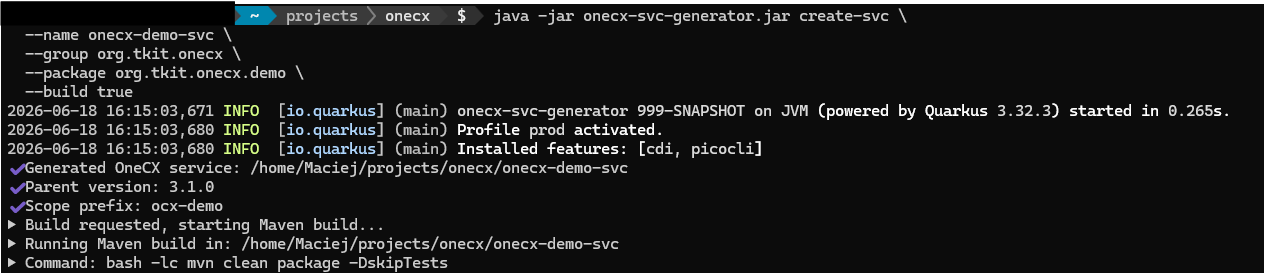

The generator creates a new directory with name from flag name and sets up the OneCX basic structure for dao, controller, api and service.
Please note that the product name from your command is not used as base of entity names, but it is used as base for some essential application parts as following:
* onecx-<name>
Project name
Helm chart name for deployment and microservice registration in OneCX
* org.tkit.onecx.<package>
Package name for the generated service
Next step may create a database schema and api components.