Shell layout
Shell v3 introduces a more structured layout model for OneCX Shell UI. The layout is organized around named slot groups and dedicated layout regions so that applications can integrate in a more predictable and structured way.
What changed
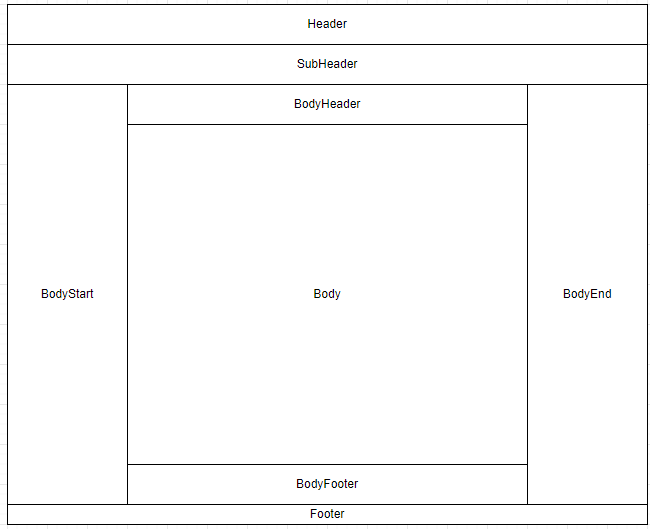
The shell viewport is now clearly structured into the following major regions:
-
header
-
sub-header
-
body start
-
body header
-
body content
-
body footer
-
body end
-
footer
This structure improves extensibility and allows the shell to separate layout responsibilities more cleanly. Below is an illustration of the new shell layout structure:
Slot-group model
Shell v3 uses slot groups as a core layout concept. A slot group represents a named region that internally provides dedicated placement areas for content. Each slot group has three placement areas:
-
.start -
.center -
.end
Depending on the slot group direction, content can be aligned to the start, center, or end of the slot group. With horizontal slot groups, the areas are arranged left to right. With vertical slot groups, the areas are arranged top to bottom. This gives more control over how content is placed within a region and helps standardize behavior.
Main shell layout regions
Examples of shell layout regions used by the viewport include:
-
onecx-shell-header -
onecx-shell-sub-header -
onecx-shell-body-start -
onecx-shell-body-header -
onecx-shell-body-footer -
onecx-shell-body-end -
onecx-shell-footer
Extensions slot
The onecx-shell-extensions slot is a dedicated area for shell extensions via remote components. It is placed in the body content region and can be used to host extension content that should be integrated within the main body area of the shell.
The recommended usage of this slot is to host extensions that are serving a global purpose for applications, such as a global notification component, rather than application-specific content. This helps ensure that the extension content is appropriately placed and accessible across the shell.
Migration considerations
The new layout model should not require immediate changes to existing applications, but it is recommended to adjust configuration of slots to align with the new slot group model and take advantage of the improved structure. For details, see Shell v3 Migration Guide.
It is not recommended to style anything in the application using the shell layout class names, structure, or placement as these are considered internal implementation details that may change in future releases. However, in case of existing styling rules that rely on shell layout structure, it is recommended to review application styling after migration to ensure it is not affected by the new layout model.
|
Existing integrations may continue working through compatibility behavior and slot remapping, but migration to the newer naming and placement model is recommended since deprecated slot names and placements may be removed in future releases. |