User Interface - Frontends in OneCX
Overview
OneCX integrates the microfrontends on client-site. This means that the individual microfrontends are loaded separately and are joined into one website inside the browser of the user. This integration is done by the OneCX Shell.
OneCX Apps can expose two kinds of mircofrontends:
-
Remote Components: These are reusable parts of the website which are independently loaded from the current URL inside a workspace e.g. the menu.
-
Microfrontends: These are parts of the website which are loaded depending on the current URL and loaded into the main area of the website.
OneCX Shell
The OneCX Shell is responsible for the client-site integration and crosscutting support tasks for the microfrontends. The OneCX Shell is free of business logic.
The support tasks of the OneCX Shell are for example:
-
Handling of authentication
-
Loading microfrontends at the correct point in time and displaying them at the correct location
-
Providing information about
-
Workspace configuration
-
Currently loaded microfrontend
-
User profile
-
User permissions
-
Theme
-
-
Displaying toast messages
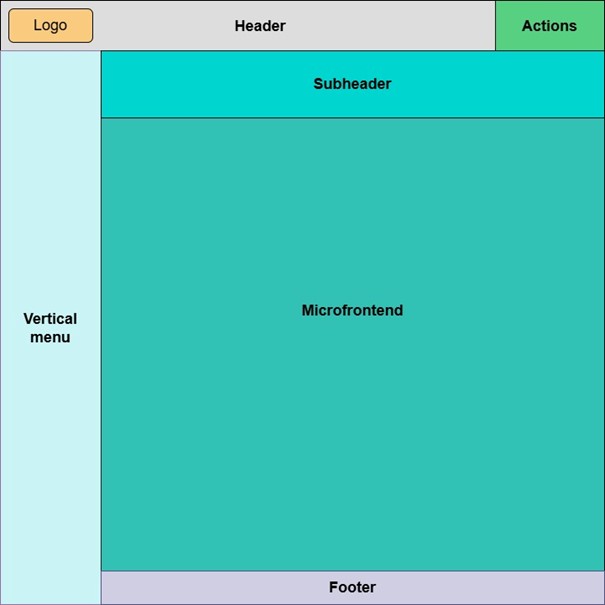
The image above shows a schematic drawing of the layout of the default shell. All boxes besides the box labeled Microfrontend are so called slots in OneCX. Slots are named areas in the layout of the shell which can be configured to contain one or more RemoteComponents.
In the box labeled Microfrontend the shell loads the microfrontend depending on the URL and URL changes.
The configuration which RemoteComponent is loaded where and which microfrontend is loaded for which URL is configured inside the workspace definition which is loaded on startup of the shell based on the URL the user has opened.
The OneCX Shell assumes the following layout of the URL:
<protocol>://<host>[:<port>]/[<path to the shell>/]<workspace name>/<microfrontend path>/<path inside the microfrontend>
-
<path to the shell>: This is the path under which the shell itself is reachable. It can be empty if the OneCX shell is hosted on top-level of the domain.
-
<workspace name>: This is the configured name of the workspace definition and identifies the workspace the shell should load on startup.
-
<microfrontend path>: This is the path prefix of a configured microfrontend inside a workspace. The OneCX Shell loads and unloads microfrontends inside the box labeled Microfrontend based on this path prefix.
-
<path inside the microfrontend>: This is the part of the URL the microfrontend itself can use to control which page inside the microfrontend is shown. This is the part of the path the application developer is responsible for.
Information Sharing
As mentioned above the OneCX shell communicates with the RemoteComponents and Microfrontends. This cannot be done via shared memory inside a library because it con not be guaranteed that each part of the website uses the same version and instance of a library.
There are in general two ways to solve this issue:
-
Usage shared memory inside the browser window. This makes it hard to version the communication, react to value changes and to garbage collect.
-
Usage of messages/events on bowser window level.
OneCX offers a versioned decentralized publish and subscribe mechanism inside the browser window. This mechanism is used to communicate information between the parts of the website. The OneCX Shell is using it to offer its integration interface to the apps.
Loading of Microfrontends
When discussing Microfrontend loading mechanisms the way how to expose the microfrontend for loading is an important factor. There are two expose microfrontends in OneCX context:
-
Angular lazy loaded modules
-
WebComponents aka Custom Elements
The way, how a microfrontend is loaded has to be configured when registering a microfrontend in OneCX.
| It is NOT recommended to use the Angular expose method. Doing so restrains the platform from using many frameworks with different versions, which means that all Microfrontends would need to use the same technology and version as the OneCX shell. |
| OneCX platform uses Module Federation technology integrated with webpack to expose and load Microfrontends. Therefore, all webcomponents which are bundled in a Module Federation compatible way are loadable. |