OneCX Docs: Module Setup
Usually, a project within OneCX like a product/application has its own documentation which needs to be integrated into the overall OneCX Docs site. To achieve this, set up a Docs module for the project.
This guide explains how to set up such a Docs module.
Module Structure
A Docs module has the following structure which is located within the root directory of a OneCX project repository:
|
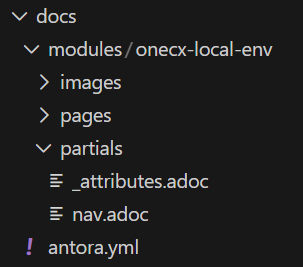
Figure 1. Example
|
-
The module name
your-projectshould match your project name. It should be unique within the OneCX Docs site because after the integration, it will be part of the overall documentation. -
Directories and files:
-
images/⇒ Store module-specific images here. -
pages/⇒ Contains the documentation pages in AsciiDoc format. -
partials/⇒ Contains partial files-
_attributes.adoc⇒ module-specific attributes -
nav.adoc⇒ navigation structure, to be included in the overall site navigation
-
-
antora.yml⇒ The Antora module descriptor file. This file has a fixed content, see below.
-
Navigation Setup
To integrate your module into the OneCX Docs site, set up the navigation in nav.adoc located in the partials/ folder of your module.
-
Follow the structure of existing modules as reference.
-
Ensure your module navigation fits into the overall site structure.
* xref:your-project:index.adoc[Your Project]
** xref:your-project:guidelines.adoc[Guidelines]
** xref:your-project:setup.adoc[Setup Instructions]
Integration into Overall Site
To include your module navigation into the overall OneCX Docs site navigation, ask for help from the documentation maintainers. They will include your module’s nav.adoc file in the appropriate place in the main navigation structure.
|
The main navigation file is located in the parent documentation project at |
Module Descriptor
The antora.yml file in your module’s root directory defines the module metadata.
|
Because the module will be part of the OneCX Docs site, use the following fixed content. |
# Define the same name space as used in antory.yml
name: documentation
version: latest
# Do not add any further properties here. This will affect the parent documentation project.
All the properties/attributes are inherited from the parent documentation project.
|
If you want to define module-specific attributes, do this in the |