OneCX Docs: Formatting & Conventions
This guide summarizes a collection of common AsciiDoc features and conventions to be used in OneCX documentation. Take into account that this is a living document and will be updated over time.
Pay attention to the OneCX Docs: Guidelines and OneCX Docs: Writing Style!
Navigation
-
Each module must have a
nav.adocfile in thepartials/folder. -
The
nav.adocdefines the module navigation structure. -
Follow the structure of existing modules as reference.
|
Global Attributes
-
Global attributes are set on the parent site. Do not redefine them in modules.
Global Attributes, excerptproduct: OneCX Platform product-version: latest toclevels: 2
Page Attributes
-
Page attributes can be defined on top of the page as needed.
-
A good practice is to
-
Set
:imagesdir:to the localimages/folder of the module. -
Define attributes for commonly referenced URLs.
Use them like this:AsciiDoc.
-
:idprefix:
:idseparator: -
:imagesdir: ../images

:asciidoc_doc_link:    link:https://docs.asciidoctor.org/asciidoc/latest/[AsciiDoc]
:api_guidelines_link:  xref:documentation:onecx-docs-dev:guidelines/api_guidelines.adoc[API Guidelines]
Headings
-
Use consistent heading levels (
=,==,====) throughout the documentation.
Start a page always with a single=title. -
Limit nesting to 3–4 levels for clarity.
-
Use meaningful and concise headings that reflect the content of the section.
-
Avoid overly long or complex headings ⇒ Check TOC for readability.
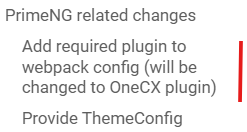
Figure 1. Bad Heading Example
|
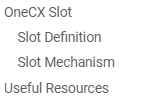
Figure 2. Good Heading Example
|
Includes
-
Use
include::to reuse content. -
When embedding a page section under the current heading, apply
leveloffset.
include::./scripts.adoc[leveloffset=+1]-
Place frequently reused fragments in
partials/folder of the module.
Collapsible Sections
-
Wrap long text, tables or optional sections with
[%collapsible] in ====blocks. -
Use a meaningful caption for the section.
-
Use collapsible sections to improve readability and reduce scrolling.
 .Example Collapsible Section
 [%collapsible]
 ====
 include::documentation:onecx-docs-apps:page$_core-app-table.adoc[]
 ====
Example Collapsible Section (rendered)
| Application | Description |
|---|---|
Handles user authentication, authorization, and identity management within the OneCX platform. |
|
Used by some applications |
|
Declared and used in applications. |
|
Application data (components, slots etc.) |
|
The main user interface framework for OneCX applications. |
|
Represents a customer or organizational unit using OneCX |
|
Customizing the look and feel of OneCX for a tenant |
|
Managing user-specific settings and preferences |
|
Customizing the working areas for users |
Cross-References
-
Use
xref:for links within OneCX documentation. -
Do not use hard coded URLs on the final docs site.
-
Keep links relative within the module if possible.
xref:./setup.adoc[Setting up]
xref:./scripts/start.adoc[start-onecx.sh]-
For cross-module references, use the full path:
xref:documentation:onecx-docs-dev:guidelines/api_guidelines.adoc[API Guidelines]External Links
-
Use concise inline links:
https://www.keycloak.org/[Keycloak]-
Define attributes for commonly referenced URLs and reuse them.
Admonitions
-
Use AsciiDoc admonitions for clarity.
-
Standard types:
NOTE,IMPORTANT,CAUTION,TIP,WARNING
[IMPORTANT]
====
Critical guidance, e.g. WSL2 setup on Windows.
====|
Critical guidance, e.g. WSL2 setup on Windows. |
Code Blocks
-
Use
[source,<lang>]with fenced blocks. -
Use a meaningful caption for the section.
-
Language examples:
bash,javascript,json,yaml,sql,text.
 .Example Source Block
 [source,bash]
 ----
 ./start-onecx.sh -p all
----./start-onecx.sh -p allImages
-
Set
:imagesdir:at top of the page and reference images with meaningful captions.
.Successful start
image::scripts/script_start-onecx.sh.png[]
Lists
-
Common list types: unordered (
*), ordered (.) and description lists. -
Use nested lists for sub-items.
-
Description lists are great for compact option docs.
-
Add the
horizontalrole for side-by-side rendering and specify labelwidth in percent if needed.
-s::
Enables secure mode, which enforces authentication/authorization and taken into account the tenant ID of the user. (Default: disabled)- -s
-
Enables secure mode, which enforces authentication/authorization and taken into account the tenant ID of the user. (Default: disabled)
[horizontal,labelwidth=10]
-s::
Enables secure mode, which enforces authentication/authorization and taken into account the tenant ID of the user. (Default: disabled)| -s |
Enables secure mode, which enforces authentication/authorization and taken into account the tenant ID of the user. (Default: disabled) |
Tables
-
Use role-based striped tables and column definitions.
-
Use a meaningful caption for the section.
-
The first line is the header, followed by a blank line, or define with
h|. -
Keep tables small and concise for readability.
.Example Table
[.stripes-even,cols="20,~"]
|===
| Service  | Description

| Keycloak | IAM service used by OneCX
| pgAdmin  | Manage Postgres databases
|===| Service | Description |
|---|---|
Keycloak |
IAM service used by OneCX |
pgAdmin |
Manage Postgres databases |
For large tables, consider breaking them into smaller, more focused tables or using collapsible sections.
Multi-line Tables
If the table is to contain multi-line text, it is recommended to use the column style identifier m to allow multi-line cells. This improves readability and avoids layout problems.
For source code blocks, use the column style identifier a in a same way.
.Example multi-line table
[.stripes-even,cols="20m,~"]
|===
h| Service
h| Description
| Keycloak | IAM service used by OneCX. +
It provides identity and access management.
| pgAdmin  | Manage Postgres databases. +
It offers a graphical interface for database administration.
|===Service |
Description |
|---|---|
|
IAM service used by OneCX. |
|
Manage Postgres databases. |