Check local Docker images
The check-images.sh script is used to list local Docker images with version information. It can be run from the root directory of the onecx-local-env repository.
./check-images.sh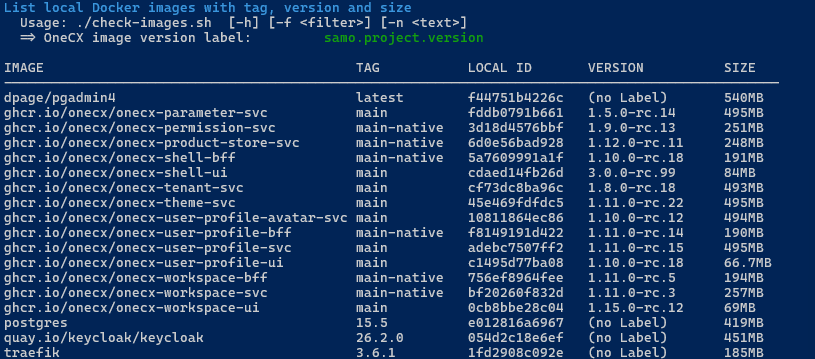
|
The local Docker images can easily be updated using the script update-images.sh. |
Available Options
The script accepts several optional options to customize its behavior. Some options can be combined. The options are:
- -f
-
Image filter, see https://docs.docker.com/reference/cli/docker/image/ls/#filter
- -h
-
Displays help information about the script and its available options. If used then all other options are ignored.
- -n <text>
-
Name filter, find images which have <text> into image name
Examples
List images with onecx in name
./check-images.sh -n onecx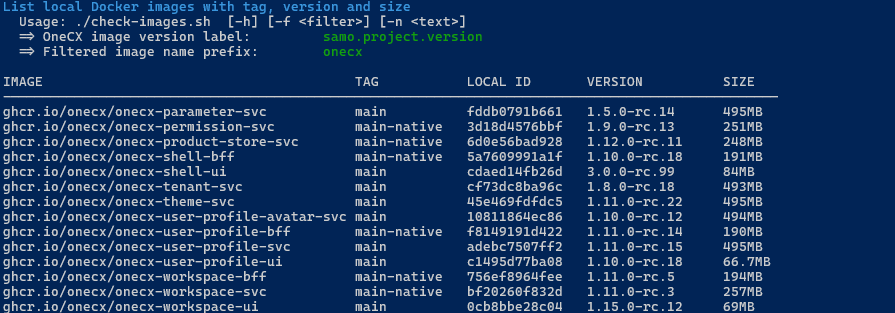
List images marked as dangling
List images marked as dangling, which means they are not tagged and not referenced by any container. This happens if there is a newer version of an image built or pulled. Such images can be removed without affecting any running container.
./check-images.sh -f "dangling=true"The -f option can be combined with the -n option to filter for dangling images with a specific name pattern.
./check-images.sh -f "dangling=true" -n svcUnderstanding the Listing
OneCX Version Labelling
When building OneCX images, the version is set in the label samo.project.version. The value of this label is displayed in the listing as VERSION.
Outdated Images
Over time, local Docker images become outdated. Especially after updates, images with the tag <none> may be listed.
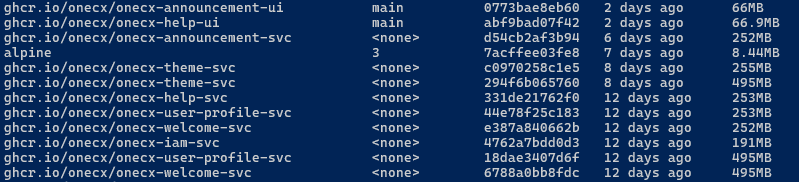
Such images can be removed. The script update-images.sh can be used or native with
docker image rm <image-id>