Configure Search Tests
ACTION S11
- Configure Search Tests
-
In alignment to the adaptations made in the search component, you will also need to adapt the generated tests for the search component. This includes updating the test data and expected results in the spec files to reflect the changes made to the search component, such as the column definitions and the structure of the search results.
This ensures that the tests accurately validate the functionality of the search component based on the customized implementation.
Search Component
Template
Replace all occurrences of changeMe in the generated search component spec file with the actual property name used in the search criteria and search results.
Update the test data in the spec file to reflect the expected structure and values based on the customized search component implementation.
| Directory |
|
| File |
|
ACTION S11 in <resource>-search.component.spec.ts
  const base<%= resourceClassName %>SearchViewModel: <%= resourceClassName %>SearchViewModel = {
    columns: <%= resourcePropertyName %>SearchColumns,
    searchCriteria: { changeMe: '0' },
    searchExecuted: true,
    results: [],
    searchLoadingIndicator: false,
    diagramComponentState: null,
    resultComponentState: null,
    searchHeaderComponentState: null,
    chartVisible: false,
  };
...
Example: Book Search Component
| Directory |
|
| File |
|
ACTION S11 in book-search.component.spec.ts
Replace all occurrences of changeMe with bookTitle and CHANGE_ME with BOOK_TITLE.
  const baseBookSearchViewModel: BookSearchViewModel = {
    columns: bookSearchColumns,
    searchCriteria: { bookTitle: '0' },
    searchExecuted: true,
    results: [],
    searchLoadingIndicator: false,
    diagramComponentState: null,
    resultComponentState: null,
    searchHeaderComponentState: null,
    chartVisible: false
  }
...
24 occurances of changeMe were replaced by bookTitle.
7 occurances of CHANGE_ME were replaced by BOOK_TITLE.
Search Effects
Template
Replace all occurrences of changeMe in the generated search effects spec file with the actual property name used in the search criteria and search results.
Update the test data in the spec file to reflect the expected structure and values based on the customized search component implementation.
| Directory |
|
| File |
|
ACTION S11 in <resource>-search.effects.spec.ts
...26 occurances of changeMe must be replaced by bookTitle.
Example: Book Effects
| Directory |
|
| File |
|
ACTION S11 in book-search.effects.spec.ts
Replace all occurrences of changeMe with bookTitle and CHANGE_ME with BOOK_TITLE.
// ACTION S11: Change test data in the whole document
describe('BookSearchEffects', () => {
  let actions$: ReplaySubject<Action>
  let effects: BookSearchEffects
  let store: MockStore<Store>
  let router: jest.Mocked<Router>
  let route: ActivatedRoute
  let bookService: jest.Mocked<BookAPIService>
  let portalDialogService: jest.Mocked<PortalDialogService>
  let messageService: jest.Mocked<PortalMessageService>
  let exportDataService: jest.Mocked<ExportDataService>

  const mockCriteria: BookSearchCriteria = { bookTitle: 'test' }

...
6 occurances of changeMe were replaced by bookTitle.
2 occurances of CHANGE_ME were replaced by BOOK_TITLE.
Search Reducers
Template
Replace all occurrences of changeMe in the generated search reducers spec file with the actual property name used in the search results.
Update the test data in the spec file to reflect the expected structure and values based on the customized search component implementation.
| Directory |
|
| File |
|
ACTION S11 in <resource>-search.reducers.spec.ts
// ACTION S11: Change test data in the whole document
describe('<%= resourcePropertyName %>SearchReducer', () => {
  it('should reset results and criteria on resetButtonClicked', () => {
    const preState = { ...reducers.initialState, results: [{ id: '1' }], criteria: { changeMe: 'val' } }
    const action = <%= resourcePropertyName %>SearchActions.resetButtonClicked()
    const nextState = reducers.<%= resourcePropertyName %>SearchReducer(preState, action)

    expect(nextState.results).toEqual([])
    expect(nextState.criteria).toEqual({})
  })
...
Example: Book Reducers
| Directory |
|
| File |
|
ACTION S11 in book-search.reducers.spec.ts
Replace all occurrences of changeMe with bookTitle.
// ACTION S11: Change test data in the whole document
describe('bookSearchReducer', () => {
  it('should reset results and criteria on resetButtonClicked', () => {
    const preState = { ...reducers.initialState, results: [{ id: '1' }], criteria: { bookTitle: 'val' } }
    const action = bookSearchActions.resetButtonClicked()
    const nextState = reducers.bookSearchReducer(preState, action)

    expect(nextState.results).toEqual([])
    expect(nextState.criteria).toEqual({})
  })
...
3 occurances of changeMe were replaced by bookTitle.
Search Selectors
Template
Replace all occurrences of changeMe in the generated search selectors spec file with the actual property name used in the search results.
Update the test data in the spec file to reflect the expected structure and values based on the customized search component implementation.
| Directory |
|
| File |
|
ACTION S11 in <resource>-search.selectors.spec.ts
describe('<%= resourceClassName %>Search selectors', () => {
  describe('selectResults projector', () => {
    // ACTION S11: Adjust test data
    const cases = [
      {
        desc: 'should map results to RowListGridData[]',
        input: [
          { id: '1', changeMe: 'A' },
          { id: '2', changeMe: 'B' }
        ],
        expected: [
          { imagePath: '', id: '1', changeMe: 'A' },
          { imagePath: '', id: '2', changeMe: 'B' }
        ]
      },
      {
        desc: 'should use empty string fallback when item.id is falsy',
        input: [
          { id: '', changeMe: 'A' },
          { id: '', changeMe: 'B' },
          { id: '', changeMe: 'C' }
        ],
        expected: [
          { imagePath: '', id: '', changeMe: 'A' },
          { imagePath: '', id: '', changeMe: 'B' },
          { imagePath: '', id: '', changeMe: 'C' }
        ]
      }
    ]
...
    // ACTION S11: Adjust test data
    const columns = [{ id: 'changeMe', nameKey: 'Col 1', columnType: ColumnType.STRING }]
    const searchCriteria = {
      pageNumber: 1,
      pageSize: 10,
      changeMe: 'A'
    }
    const results = [{ imagePath: '', id: '1', changeMe: 'A test' }]
...
Example: Book Search Selectors
| Directory |
|
| File |
|
ACTION S11 in book-search.selectors.spec.ts
describe('BookSearch selectors', () => {
  describe('selectResults projector', () => {
    // ACTION S11: Update test data
    const cases = [
      {
        desc: 'should map results to RowListGridData[]',
        input: [
          { id: '1', bookTitle: 'Book A', bookType: 'crime' },
          { id: '2', bookTitle: 'Book B' }
        ] as never[],
        expected: [
          { imagePath: '', id: '1', bookTitle: 'Book A', bookType: 'BOOK_SEARCH.RESULTS.BOOK_TYPES.CRIME' },
          { imagePath: '', id: '2', bookTitle: 'Book B', bookType: '' }
        ]
      },
      {
        desc: 'should use empty string fallback when item.id is falsy',
        input: [
          { id: '', bookType: 'crime', bookTitle: 'Book A' },
          { id: '', bookType: 'mystery', bookTitle: 'Book B' },
          { id: '', bookType: 'fantasy', bookTitle: 'Book C' }
        ] as never[],
        expected: [
          { imagePath: '', id: '', bookTitle: 'Book A', bookType: 'BOOK_SEARCH.RESULTS.BOOK_TYPES.CRIME' },
          { imagePath: '', id: '', bookTitle: 'Book B', bookType: 'BOOK_SEARCH.RESULTS.BOOK_TYPES.MYSTERY' },
          { imagePath: '', id: '', bookTitle: 'Book C', bookType: 'BOOK_SEARCH.RESULTS.BOOK_TYPES.FANTASY' }
        ]
      }
    ]
...
    // ACTION S11: Adjust test data
    const columns = [{ id: 'bookTitle', nameKey: 'Col 1', columnType: ColumnType.STRING }]
    const searchCriteria = {
      pageNumber: 1,
      pageSize: 10,
      bookTitle: 'A'
    }
    const results = [{ imagePath: '', id: '1', bookTitle: 'A test', bookType: 'BOOK_SEARCH.RESULTS.BOOK_TYPES.CRIME' }]
...
13 occurances of changeMe were replaced by bookTitle and some other properties.
Execute Tests
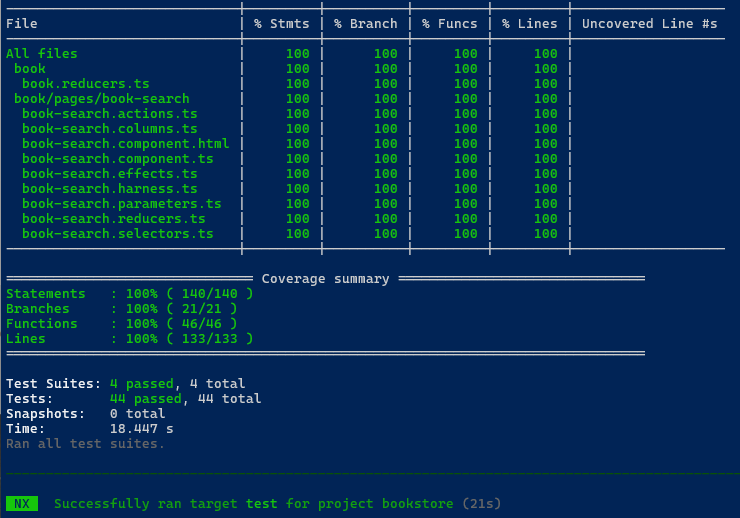
After adapting the tests, you can execute them to ensure that they are working correctly and validating the functionality of the search component as expected.
Use the following command to run the tests for the search component:
npm run testThis will execute the test suite and provide feedback on the success or failure of the tests based on the adapted test cases and expected results.
Make sure to review the test results and address any issues that may arise to ensure that your search component is functioning correctly and meets the desired requirements.