OneCX Backend Service Generator
The OneCX Backend Service Generator standardizes and accelerates the development of backend microservices within the OneCX framework. It automates the creation of the core project layout, database configurations, and initial API endpoints, ensuring consistency and adherence to architecture best practices across the platform.
While the generator establishes a fully compliant blueprint, implementing the actual domain-specific business logic requires manual steps. Throughout this documentation, these mandatory development steps are explicitly highlighted as [ACTION] indicators to guide you through the necessary code modifications.
To demonstrate the end-to-end workflow and the required manual adjustments, this guide walks you through a practical example: a demo product management service. The onecx-demo-svc showcases how to expose an API to create, read, and persist products and their related line items in a database.
Prerequisites
Environment Setup
Make sure your development environment is set up correctly before using the OneCX SVC Generator.
The following tools must be installed and versions verified:
-
java version should be 25
-
maven version should be >= 3.9.15
-
JAVA_HOME environment variable should be set to the path of your JDK installation
java --version
mvn --version
echo $JAVA_HOME
Generation by Example
Let’s explore the capabilities of the OneCX Backend Service Generator through a practical example, the Demo. We will create a simple backend Product management, which includes database and API for storing, searching, deleting and update products.
| Please note that the generator does not create the database itself. You will need to set up a database separately and configure the connection in your service. The generator will create only the necessary database scripts via Liquibase changelogs to set up the required tables and relationships. |
Generate the Service
Follow the steps below. Start from top to bottom.
-
Create Backend Service ⇐ start here
|
Build the service step by step, roughly following the suggested order above. This iterative approach allows you to understand the structure of the generated code and make necessary adjustments along the way. After generating each part, take the time to review the generated code, run the service, and ensure that everything is working as expected before moving on to the next part. This iterative approach helps in identifying and fixing issues early in the development process, leading to a more robust and maintainable service. |
Build the Service
After generating the service you can build the service manually. With the --build option during generation, the service will be built automatically.
Use the following command to build the service without running tests (without the -DskipTests option then tests are executed):
mvn clean package -DskipTestsTest the Service
After building the service, it is crucial to run the tests to ensure that everything works as expected. The generator creates only basic test cases for the generated components. You may need to add further tests or adapt the existing ones to your specific requirements and business logic.
Use the following command to run the tests:
mvn test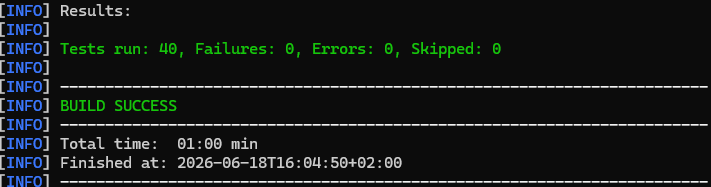

Customize Generation using Templates
If you wish to customize the generated code, you must modify the SVC generator itself. To do this, use the templates located in the src/main/resources/templates/ directory.
The generator uses these templates to create the files required for your service.
List of SVC Generator Files
onecx-svc-generator/
├─ .github/
│  └─ workflows/
│     └─ release.yml
├─ examples/
│  └─ model.yaml
├─ src/
│  ├─ main/
│  │  ├─ java/
│  │  │  └─ org/tkit/onecx/onecxsvcgen/
│  │  │     ├─ Main.java
│  │  │     ├─ commands/
│  │  │     │  ├─ AddEntityCommand.java
│  │  │     │  ├─ BatchModelCommand.java
│  │  │     │  └─ CreateSvcCommand.java
│  │  │     ├─ model/
│  │  │     │  ├─ ApiDef.java
│  │  │     │  ├─ EntityDef.java
│  │  │     │  ├─ FieldDef.java
│  │  │     │  └─ RelationDef.java
│  │  │     └─ service/
│  │  │        ├─ BuildService.java
│  │  │        ├─ GitHubActionsService.java
│  │  │        ├─ LiquibaseChangelogService.java
│  │  │        ├─ ModelParserService.java
│  │  │        ├─ NamingService.java
│  │  │        ├─ OpenApiService.java
│  │  │        └─ TemplateService.java
│  │  └─ resources/
│  │     ├─ application.properties
│  │     └─ templates/
│  │        ├─ entity/
│  │        │  ├─ Controller.java.tpl
│  │        │  ├─ DAO.java.tpl
│  │        │  ├─ Entity.java.tpl
│  │        │  ├─ ExternalController.java.tpl
│  │        │  ├─ ExternalExceptionMapper.java.tpl
│  │        │  ├─ ExternalMapper.java.tpl
│  │        │  ├─ InternalExceptionMapper.java.tpl
│  │        │  ├─ Liquibase-changelog.xml.tpl
│  │        │  ├─ Liquibase-changeset.xml.tpl
│  │        │  ├─ Mapper.java.tpl
│  │        │  ├─ NonRootDAO.java.tpl
│  │        │  └─ Service.java.tpl
│  │        ├─ github/
│  │        │  ├─ renovate.json.tpl
│  │        │  └─ workflows/
│  │        │     ├─ build.yml.tpl
│  │        │     ├─ build-branch.yml.tpl
│  │        │     ├─ build-pr.yml.tpl
│  │        │     ├─ build-pr-merge.yml.tpl
│  │        │     ├─ build-release.yml.tpl
│  │        │     ├─ create-fix-branch.yml.tpl
│  │        │     ├─ create-new-build.yml.tpl
│  │        │     ├─ create-release.yml.tpl
│  │        │     ├─ documentation.yml.tpl
│  │        │     ├─ security.yml.tpl
│  │        │     └─ sonar-pr.yml.tpl
│  │        ├─ svc-project/
│  │        │  ├─ Chart.yaml.tpl
│  │        │  ├─ Dockerfile.jvm.tpl
│  │        │  ├─ Dockerfile.native.tpl
│  │        │  ├─ application.properties.tpl
│  │        │  ├─ gitignore.tpl
│  │        │  ├─ openapi-skeleton.yaml.tpl
│  │        │  ├─ pom.xml.tpl
│  │        │  └─ values.yaml.tpl
│  │        └─ test/
│  │           ├─ AbstractTest.java.tpl
│  │           ├─ ControllerIT.java.tpl
│  │           ├─ ControllerTest.java.tpl
│  │           ├─ ExternalControllerIT.java.tpl
│  │           └─ ExternalControllerTest.java.tpl
├─ .gitignore
├─ LICENSE
├─ pom.xml
└─ README.md
For example, if you have your own ideas about how to structure the controllers, you can edit the Controller.java.tpl template file. After making changes, you have to re-run the generator to apply your customizations to the generated code.
This allows you to tailor the generated code to better fit your specific requirements and coding standards while still benefiting from the automation provided by the generator.